Every missing operation, found and proven.
TorqBox Office reviews your repair plan against the applicable repair procedures, identifies missed operations and gives you the source material to support them with the insurer.
No more digging through OEM portals line by line.
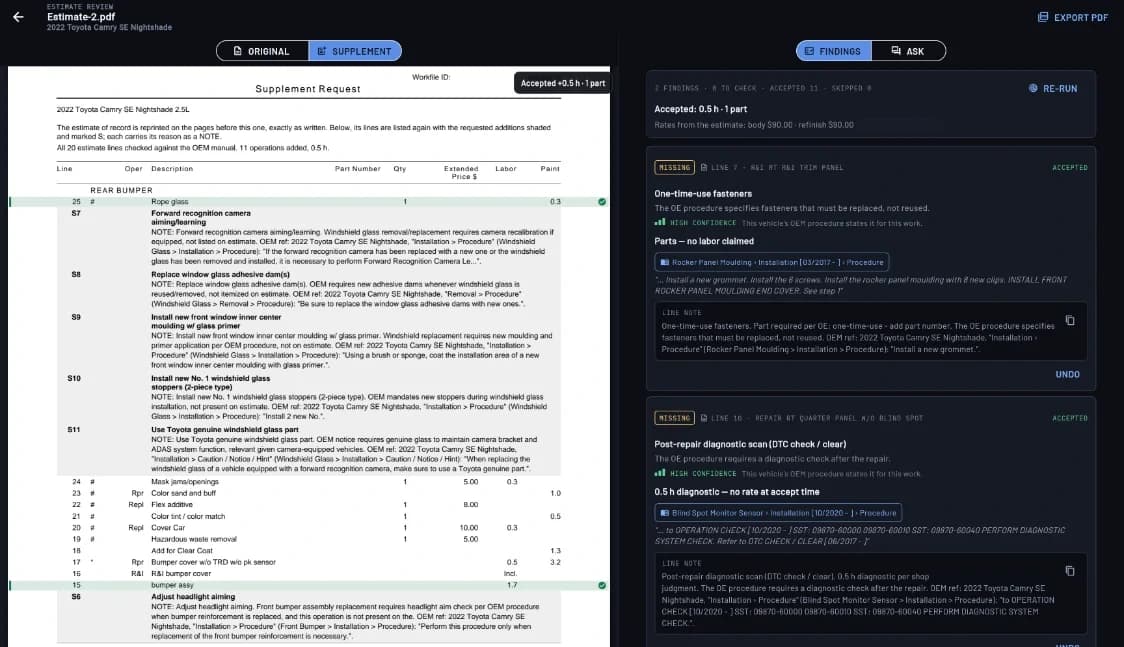
The repair plan, checked against the procedure.
Your repair plan says what the shop intends to do. The repair procedure says what the vehicle requires. Office helps you reconcile the two.
Upload your repair plan.
Print it to PDF from your shop's system and upload it. Office reads it line by line.
Review what it missed.
Each finding shows the operation, why this vehicle needs it, the page that supports it and, for labor, what it's worth at the rates printed on your repair plan. Anything probably already paid inside another line is listed apart, so you don't ask twice. You accept or skip every line.
Export the write-up.
Copy paste-ready line notes into your shop's system, or export a supplement request with your repair plan in front and every added line explained.
You stay in your own system. TorqBox never edits your repair plan. Nothing goes on it unless you put it there.
A more defensible repair plan, before it leaves the shop.
Catch the missed operation before the repair plan goes out, and every line you add arrives with the page behind it. That means fewer supplements, fewer documentation requests, faster approvals, and less time in OEM portals.